HAZECO Complaint Guide – How to Register Electricity Complaints
When to Lodge a HAZECO Complaint
You should register a complaint whenever you experience problems such as power outages, voltage fluctuations, damaged meters, billing errors or safety hazards. The Customer Complaint Management System (CCMS) provides a resolution time matrix that gives an idea of how quickly typical issues are addressed. For example:
- Power outage: ~3 hours 15 minutes
- Damaged meter: ~6 hours
- Electric fire or fallen live wire: ~1 hour
- Low/high voltage (short term): ~6 hours
- Long‑term voltage issues: up to 15 days
- Wrong meter reading / Excess billing / No meter reading taken: typically 72 hours
- Delayed billing for a new connection: ~10 days
These times are targets; complex cases may require longer investigations.
Gather the Right Information First
Before lodging your complaint, make sure you have:
- Your 14‑digit reference number (printed on the top left of your bill).
- Consumer name and mobile number for status updates.
- Nature of the issue (e.g., “Low voltage” or “Meter burnt”).
- Nearest landmark or address to help field teams locate the fault.
Having these details ready will help the support staff verify your account quickly and ensure the issue is routed to the right department.
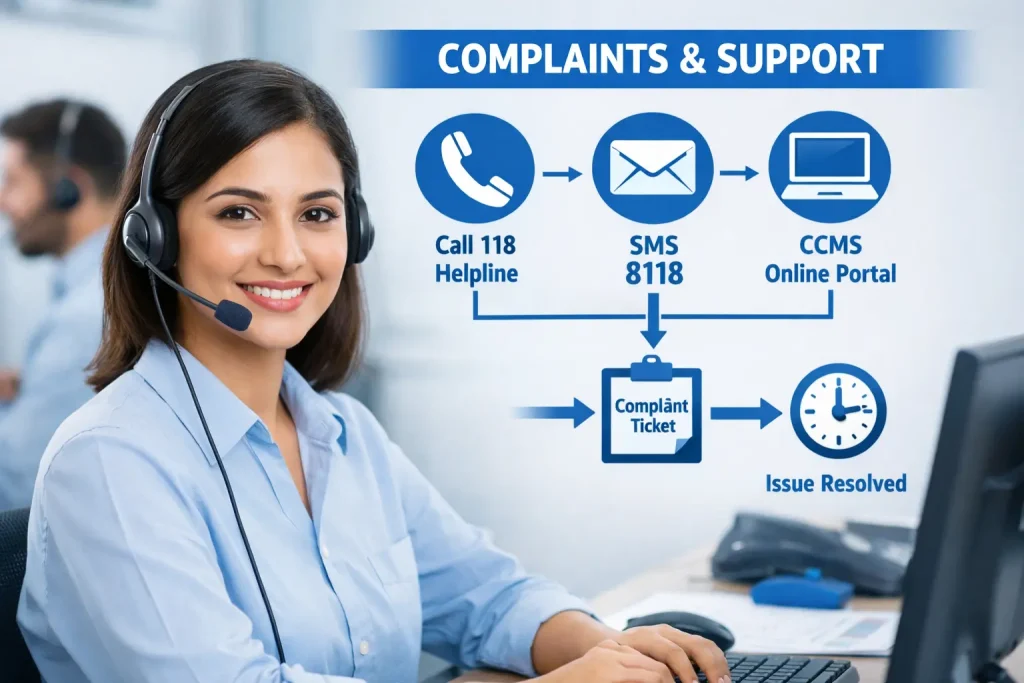
Complaint & Support Channels
1. 118 – 24/7 Helpline (Voice)
For emergencies such as fallen wires, fire hazards, or a complete power blackout, the fastest way to reach the network operator is to dial 118. The CCMS states that customers can call its contact centre at 118 to lodge complaints.
This service operates round the clock. When you call, clearly mention your reference number and describe the problem; the operator will register your complaint and give you a ticket number.
2. 8118 – SMS Complaint Service
If you prefer SMS or have poor call connectivity, send a text message to 8118 in the following format:
[Reference Number] [space] [Brief description] [space] [Your Name]
The CCMS notes that you can send your complaint by SMS to 8118. After sending the SMS, you will receive an automated reply with your complaint/ticket number.
This channel is ideal for quick reporting of faults such as low voltage, sparking transformers or billing issues.
3. Online CCMS Portal
For detailed or non‑urgent complaints, use the Customer Complaint Management System (CCMS) at ccms.pitc.com.pk. The portal allows you to register complaints by reference number, mobile number or CNIC.
According to the official CCMS process, your complaint will be auto‑acknowledged within 24 hours. The system will investigate and liaise with relevant departments, working to resolve the complaint within 14 days of receipt.
If a case requires more time, the portal will notify you about the extension and keep you informed of the status.
How to submit online:
- Visit the Register Complaint page on ccms.pitc.com.pk.
- Search your account using the reference number, mobile number or CNIC.
- Fill in the complaint form – select the category (e.g., Line Complaint or Non‑Line Complaint), choose the type from the drop‑down list, describe your issue and provide your contact details.
- Submit the form; note down the ticket number for future tracking.
- You can track your complaint status on the same website using the reference or ticket number.
4. Email – Written Complaints
If you prefer a written record or need to attach documents (such as photos of faulty equipment or billing evidence), send an email to [email protected].
For escalation beyond the initial investigation, you can write to the Head of Quality & Assurance at [email protected]. Clearly state your reference number, contact details and a thorough description of the problem.
5. Walk‑in or Telephone Support
You can also reach the Power Information Technology Company (PITC) – the organisation managing CCMS – for assistance. Their office is at WAPDA House, Shahra‑e‑Quaid‑e‑Azam, The Mall, Lahore.
You may call +92‑42‑99202666 or the exchange numbers +92‑42‑99202211‑14 (ext. 3024) These contacts are useful if you need administrative help or cannot access the helpline.
Tips for Faster Resolution
- Describe the issue clearly: Use specific keywords (e.g., “High voltage in Haripur” or “Wrong reading on September bill”) to help staff categorise your complaint correctly.
- Keep your ticket number safe: You’ll need it to track progress.
- Check your SMS/email regularly: Updates from CCMS or the helpline will inform you of acknowledgement and resolution.
- Follow up if necessary: If your issue is not resolved within the published timeframe (e.g., 3 hours for a power outage or 72 hours for billing errors, call 118 or email [email protected] to request escalation.
Conclusion
The HAZECO complaint system is designed to be accessible and transparent. By using the official helpline 118, the 8118 SMS service, or the online CCMS portal, you can ensure that your complaint is registered, acknowledged within 24 hours and resolved within a reasonable timeframe.
Keeping your reference number handy and providing clear details will speed up the process. For serious faults or unresolved issues, you can contact the PITC office in Lahore. Staying informed about the complaint process helps ensure you get the reliable electricity service you deserve.
If you haven’t checked your bill yet, you can check it here -> HAZECO Bill Check